
Download Ushot – Free, Secure Screen Capture Tool for Windows, Mac, Android & iOS
Looking for a lightweight, fast, and reliable screen capture tool? Ushot is a free, no-strings-attached screen capture application designed for Windows, Mac, Android, and iOS users. Developed by Prashant, Ushot offers a simple yet powerful way to capture your screen with precision.
Whether you're documenting a bug, creating tutorials, or saving important information, Ushot delivers clean, high-quality screenshots in seconds. With its minimal interface and instant access, Ushot stands out among free screen capture tools. No installation hassles, no ads, and no bloatware—just pure functionality.
Ideal for students, professionals, and casual users alike, Ushot ensures your screen capture experience is smooth, secure, and efficient. Download Ushot today and take control of your screen capture needs.
Key Features of Ushot Screen Capture Tool
Ushot is built with simplicity and performance in mind, offering a streamlined set of features that deliver exceptional value. One of its standout features is the instant screenshot capture using a customizable hotkey. Simply press the designated key combination—default is Ctrl + Shift + S—and your entire screen is captured instantly. This makes it perfect for quick documentation or capturing fleeting moments on your screen. The tool also supports region selection, allowing you to capture only a specific area, which is ideal for focusing on important details without clutter.
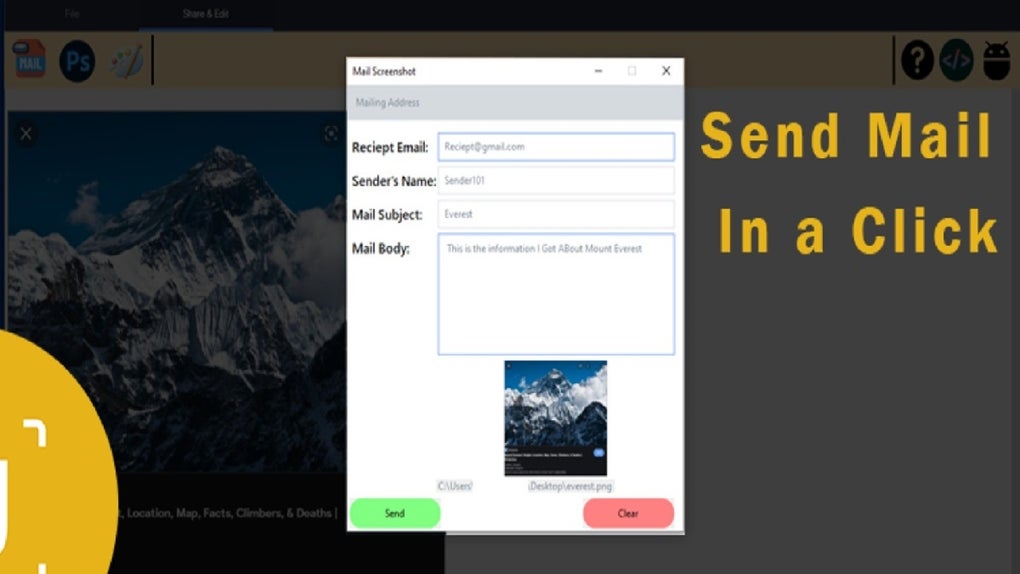
Another powerful feature is auto-save with customizable file paths. You can set Ushot to automatically save your screenshots to a preferred folder, eliminating the need to manually locate and rename files. The app also supports multiple image formats, including PNG, JPG, and BMP, giving you flexibility based on your use case. For users who need to share screenshots quickly, Ushot includes a one-click copy to clipboard function, enabling seamless integration with email, messaging apps, or design tools.
Security is a top priority. Ushot operates locally—no data is sent to external servers—ensuring your captured content remains private. The app is completely free with no trial limitations, in-app purchases, or hidden costs.
It’s also lightweight, consuming minimal system resources, making it suitable for older machines. Whether you're working on a budget laptop or a high-end workstation, Ushot runs smoothly without slowing down your device. With regular updates and a growing user base, Ushot continues to evolve while staying true to its core promise: simplicity, speed, and reliability.
How to Install and Use Ushot on Windows, Mac, Android, and iOS
Getting started with Ushot is incredibly easy, regardless of your device. For Windows users, visit the official website and download the .exe installer. Run the file, follow the on-screen prompts, and the app will be ready to use. No complex setup is required—just launch Ushot, and you’re good to go. The app runs in the background and is accessible via the system tray, making it always available when you need it.
For Mac users, download the .dmg file from the official site. Open the disk image, drag Ushot into your Applications folder, and launch it. The app will request permission to access screen recording (via System Settings > Privacy & Security), which is standard for screen capture tools. Once granted, Ushot works seamlessly.
Android and iOS users can download the Ushot app from the Google Play Store and Apple App Store, respectively. The mobile version supports full-screen captures, scrolling screenshots (on compatible devices), and direct sharing to social media or cloud services. On mobile, you can also use gestures—like swiping from the edge of the screen—to trigger a screenshot.
Once installed, use Ctrl + Shift + S (Windows/Mac) or the dedicated button in the app (mobile) to capture your screen. After capture, a preview window appears where you can crop, annotate, or save the image. The auto-save feature ensures your screenshots are stored exactly where you want them. You can also customize the hotkey, choose the default save location, and toggle between formats—all from the settings menu.
Compatibility & System Requirements
Ushot is designed to be cross-platform, supporting a wide range of operating systems. On desktops, it runs smoothly on Windows 7 and later, including Windows 10 and Windows 11. For Mac users, Ushot is compatible with macOS 10.14 (Mojave) and newer, including Apple Silicon (M1/M2) Macs. This ensures that both Intel and modern ARM-based Macs can use the app without performance issues.
On mobile, Ushot is available for Android 6.0 (Marshmallow) and above, and iOS 12 and later. This broad compatibility means users across different devices can enjoy a consistent experience. The app is lightweight, with a footprint under 10MB on desktop and under 20MB on mobile, making it ideal for devices with limited storage.
Despite its small size, Ushot leverages modern APIs for screen capture. On Windows, it uses the Windows Graphics Capture API; on Mac, it relies on the Screen Capture framework. On mobile, it integrates with native screen recording permissions.
This ensures high-quality captures with minimal lag. No administrator rights are required for installation, and the app runs in the background without interfering with other tasks. Whether you're using a low-end laptop or a high-performance desktop, Ushot adapts to your system’s capabilities.
Pros and Cons of Ushot Screen Capture Tool
- Pros:
- Completely free with no hidden costs or ads
- Lightweight and fast—minimal impact on system performance
- Simple, intuitive interface with instant access
- Supports multiple capture modes: full screen, region, window
- Auto-save with customizable folder paths
- One-click copy to clipboard for quick sharing
- Secure—no data sent to servers; local-only operation
- Regular updates with new features and bug fixes
- Cons:
- Limited editing tools—no advanced annotations or filters
- No built-in video recording capability (only screenshots)
- Mobile version lacks some desktop features like hotkey customization
- Minimal documentation—users may need to explore settings
- Not available on Linux or other non-standard platforms
Frequently Asked Questions (FAQ)
- Is Ushot completely free to use?
-
Yes, Ushot is 100% free with no trial periods, in-app purchases, or premium tiers. You can download and use all features without paying a single cent.
- Can I customize the screenshot hotkey?
-
Yes, Ushot allows you to change the default hotkey (Ctrl + Shift + S) to any combination you prefer through the settings menu.
- Does Ushot support scrolling screenshots on mobile?
-
Yes, the Android and iOS versions support scrolling screenshots on compatible devices, allowing you to capture long web pages or documents in one image.
- Is my data safe when using Ushot?
-
Yes, Ushot is a local-only tool. Your screenshots are stored on your device and never uploaded to external servers. Your privacy is fully protected.
- Can I use Ushot on Linux?
-
Currently, Ushot is only available for Windows, Mac, Android, and iOS. There is no official Linux version, but you can check community ports or use alternatives like Shutter.
Final Verdict: Why You Should Download Ushot Today
If you're searching for a free, secure, and reliable screen capture tool, Ushot is one of the best options available. It excels in simplicity, speed, and cross-platform support. Whether you're a student taking notes, a professional creating reports, or a content creator documenting workflows, Ushot delivers exactly what you need—no distractions, no clutter, just instant screenshots.
Its lightweight design ensures it won’t slow down your system, and the lack of ads or bloatware makes it a refreshing alternative to feature-heavy competitors. While it lacks advanced editing tools or video recording, it makes up for it with consistency and ease of use.
With regular updates and a growing community, Ushot continues to improve while staying true to its core mission. Download Ushot now and experience the power of effortless screen capturing on Windows, Mac, Android, or iOS. It’s time to take control of your digital documentation—start capturing smarter today.
Download Ushot today and enjoy a seamless, secure, and free screen capture experience across all your devices.







